archon
Gatekeeper Operation Import and DID Resolution Infographic Brief
Title
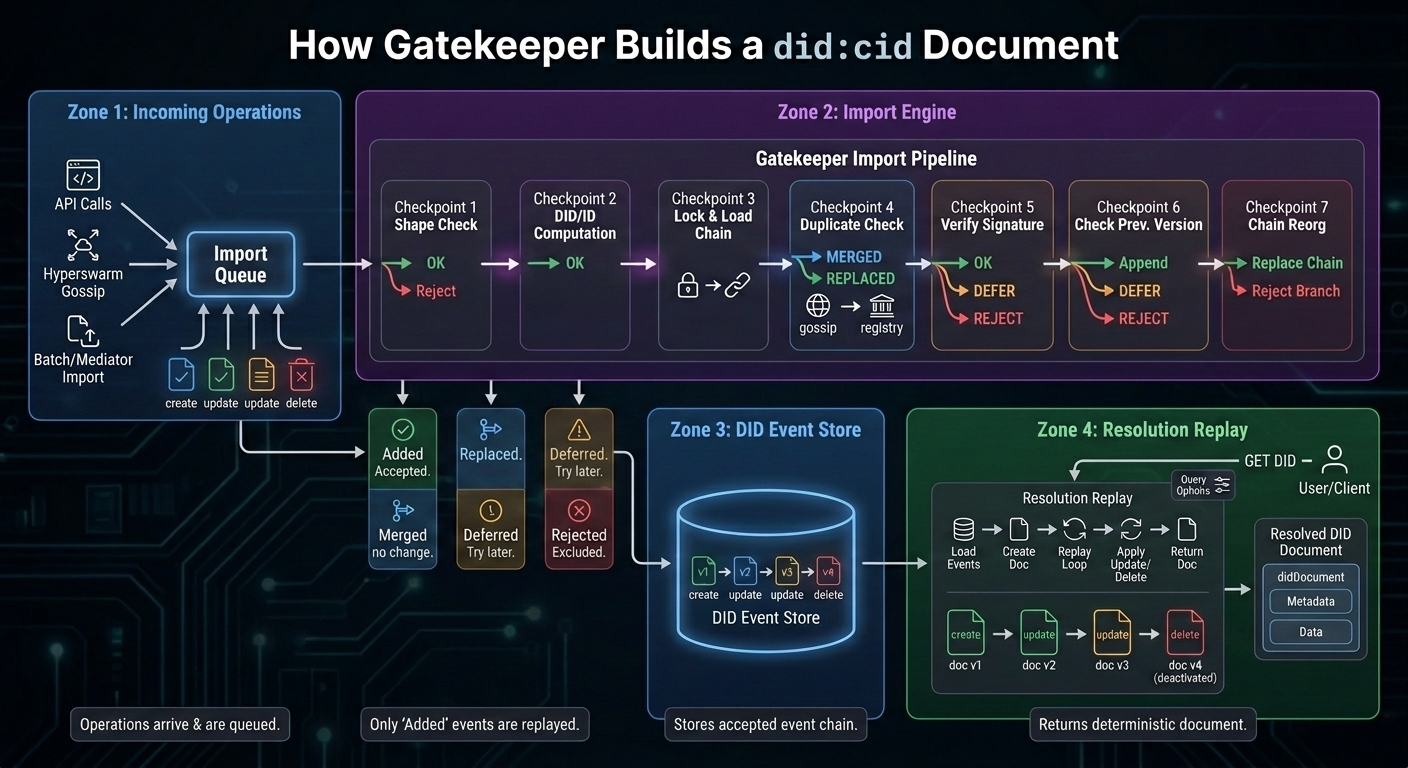
How Gatekeeper Builds a did:cid Document
The infographic should show two distinct phases:
- Event import: Gatekeeper receives operations from local clients, Hyperswarm gossip, batch imports, or registry mediators. This is where operations are accepted, merged, deferred, replaced, or rejected.
- DID resolution: Gatekeeper loads the stored event chain and replays it into a deterministic DID document.
The key visual correction: validation gates belong primarily to event import, not to the normal resolution path.
1. Overall Layout
Use a left-to-right flow with two large labeled regions:
Incoming Operations -> Gatekeeper Import Pipeline -> DID Event Store -> Resolution Replay -> Resolved DID Document
Below the import pipeline, show three side outputs:
Rejected
Deferred
Merged / Replaced
Keep the DID resolution side visually calmer than the import side. It should feel like replaying a clean event log, not re-litigating every operation.
2. Incoming Operations
On the far left, show several operation sources converging into Gatekeeper:
POST /api/v1/did- Hyperswarm
queue/batch /api/v1/dids/import/api/v1/batch/import/api/v1/batch/import/cids- Bitcoin/Satoshi mediator import
Represent the incoming stream as signed operation cards:
create
update
update
delete
Each card should carry small metadata chips:
registry
time
ordinal
opid
proof
previd
Caption:
Operations arrive from clients, peer gossip, batch imports, and registry mediators.
3. Import Queue
Show a queue box labeled:
Import Queue
Inside it, show operations waiting to be processed.
Important callout:
Shape checks and duplicate detection happen before events enter or drain from the queue.
Small pseudocode callout:
verify event shape
drop duplicate proofValue per registry
queue for processEvents()
4. Gatekeeper Import Pipeline
This is the main visual centerpiece. Show an operation moving through import-time decision gates. Each gate should have green, amber, blue, or red outputs.
Gate 1: Event Shape
Checks:
valid registry
valid time
operation present
operation <= 64 KB
proof format valid
type in create/update/delete
Outputs:
- Green: continue
- Red: reject
Gate 2: DID and Operation ID
Show Gatekeeper computing or filling:
event.did
event.opid = cid(operation)
For create operations, event.did is generated from the operation CID. For
update/delete operations, event.did comes from operation.did.
Output:
- Green: continue
Gate 3: Per-DID Lock and Current Chain
Show Gatekeeper acquiring a lock and loading the current chain:
current = store.get_events(did)
Caption:
Per-DID import is serialized so competing updates see the current chain.
Gate 4: Duplicate / Registry Upgrade
Checks:
same proof.proofValue already exists?
Outputs:
- Blue:
MERGEDif the existing event is already on the expected registry - Green:
REPLACEDif this event confirms the same operation on the expected registry - Blue:
MERGEDif it is a harmless duplicate from another path
Visual detail:
Show a local or gossip event being replaced by a later confirmed registry event for the same operation.
Gate 5: Operation Verification
Checks:
verifyOperation(operation)
For create:
- Validate
created,registration, type, registry, proof format. - Agent: verify
#key-1proof againstpublicJwk. - Asset: resolve controller at
proof.created, verify controller signature.
For update / delete:
- Resolve target DID.
- Reject deactivated DIDs.
- Resolve controller when the DID is an asset.
- Verify signature against the resolved key.
- Check target registry support.
Outputs:
- Green: continue
- Amber:
DEFERREDif the controller or previous dependency is not imported yet - Red:
REJECTEDif invalid
Important label:
Most cryptographic and controller checks happen at import time.
Gate 6: Previous Version Link
For non-create operations, check:
operation.previd
current event with opid == operation.previd
Outputs:
- Green: append if
previdpoints to current chain tip - Amber:
DEFERREDif the previous event has not arrived yet - Red:
REJECTEDif missing or incompatible
Gate 7: Reorg / Earlier Ordinal
When previd points into the middle of the current chain, show a decision:
expected registry?
earlier ordinal than next event?
Outputs:
- Green: replace the rest of the chain with the imported event
- Red: reject stale or losing branch
Caption:
Registry ordering can replace a previously stored branch when the new event is the expected confirmed event.
5. Import Outcomes
Below the import pipeline, show four outcome bins:
Added
Accepted into DID event store.
Examples:
- New create operation
- Valid update extending current tip
- Confirmed registry event replacing an unconfirmed event
Merged
Already represented; no chain change.
Examples:
- Duplicate operation received through gossip
- Same proof already present on expected registry
Deferred
Try again later.
Examples:
- Controller DID not imported yet
previdnot imported yet- Dependency may arrive from peer sync or registry import
Rejected
Does not enter the active event chain.
Examples:
- Bad proof
- Malformed operation
- Unsupported registry
- Missing
previd - Stale branch
- Invalid DID/controller relationship
Important visual implication:
Rejected operations are excluded during import. Resolution normally sees the accepted event chain.
6. DID Event Store
In the center, show a database cylinder labeled:
DID Event Store
Inside, show the resulting accepted chain:
v1 create -> v2 update -> v3 update -> v4 delete
Each stored event card should include:
opid
registry
time
ordinal
operation
Caption:
The store contains the event sequence Gatekeeper will replay for resolution.
7. Resolution Request
On the resolution side, show a user/client/API call:
GET /api/v1/did/:did
Below it, show optional query toggles:
versionTime
versionSequence
confirm=true
verify=true
Caption:
Resolution reads the stored event chain and materializes a DID document.
8. Resolution Replay
Show the resolution path as a replay loop over the accepted event chain:
load events
generate initial document from create
for each stored event:
  stop at versionTime or versionSequence
  apply update/delete
return document
The normal path should not show red rejection gates. Instead, show a clean document builder:
create -> doc v1 -> update -> doc v2 -> update -> doc v3 -> delete -> deactivated doc v4
For the create event:
- Agent DID creates
verificationMethod,authentication, andassertionMethod. - Asset DID creates
controlleranddidDocumentData.
For update events:
merge didDocument
replace didDocumentData if present
replace didDocumentRegistration if present
versionId = opid
updated = event.time
For delete events:
{
  "didDocument": { "id": "did:cid:..." },
  "didDocumentMetadata": {
    "deactivated": true
  },
  "didDocumentData": {}
}
9. Resolution-Time Options
Show these as small overlays on the replay loop, not as the main validation pipeline:
versionTime / versionSequence
Stop replay at requested historical point.
confirm=true
Stop before unconfirmed events when the confirmed chain is requested.
verify=true
Re-check signatures and previd while replaying; throw if invalid.
Important label:
Resolution may verify again when requested, but import is where operations are accepted, deferred, merged, replaced, or rejected.
10. Final Output: DID Resolution Result
On the far right, show a polished output card labeled:
Resolved DID Document
Include four sibling compartments:
{
  "didDocument": {},
  "didDocumentMetadata": {},
  "didDocumentData": {},
  "didResolutionMetadata": {}
}
Highlight key metadata fields:
versionId
versionSequence
created
updated
deleted
deactivated
confirmed
retrieved
Caption:
Gatekeeper returns the deterministic document state produced by replaying the stored event chain.
11. Suggested Visual Layout
Use four horizontal zones:
-
Incoming operations Sources -> signed operations -> import queue
-
Import and merge engine Shape checks -> duplicate/registry upgrade -> proof/controller checks -> previous-version checks -> added/merged/deferred/rejected
-
Accepted event store Materialized per-DID event chain
-
Resolution replay API request -> replay accepted chain -> final DID document
The strongest visual metaphor is:
Import validates the log. Resolution replays the log.
12. Color Semantics
Use restrained technical colors:
- Blue: incoming sources, event store, merged duplicates
- Green: added/accepted events and applied replay steps
- Amber: deferred dependencies and historical stop points
- Red: rejected operations
- Purple or dark gray: Gatekeeper import/resolution logic
- White or light card: final DID document
Avoid making the whole thing look like generic blockchain art. It should feel more like a distributed systems diagram.
13. Key Callout Text
Use these as small callout bubbles:
- Import validates the operation before it joins the DID chain.
- Resolution replays the accepted event chain.
- Deferred operations may succeed after dependencies arrive.
- Duplicate gossip is merged, not applied twice.
- Registry-confirmed events can replace earlier unconfirmed versions.
versionTimeandversionSequencestop replay at a historical point.verify=truere-checks signatures during resolution.- Delete is terminal and returns
deactivated: true.
Bottom caption:
Gatekeeper builds DID documents in two phases: first it imports operations into a per-DID event chain by accepting, merging, deferring, replacing, or rejecting them; later it resolves a DID by replaying that stored chain into a deterministic DID document.